Ξ
TOP
Usecase
FAQ
Contact
Login
Initial Registration
Language
TOP
Usecase
FAQ
Contact
Login
Initial Registration
Language
Image Processing AI Tool Facilea AI
Achieve AI (Image Learning) with No Code Easily link with rule-based Facilea using a single block.
Download Catalog
What is Facilea AI?
Achieve AI (learning functions) with no code, something that was not possible with the rule-based Facilea until now. Anyone can easily use AI (learning functions) while maintaining the core concept of Facilea. Facilea AI has two learning functions: "Classification" and "Segmentation." When learning is complete, a learning model file is output, which can be easily linked with the rule-based Facilea by using Facilea's AI block.
Facilea AI "Functions"
Labeling "per image"
Classification
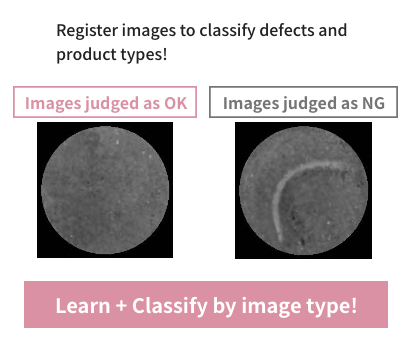
Performs classification for each image. It supports everything from 2-class classification ("OK"/"NG") to multi-class classification with three or more categories.
Labeling "per region"
Segmentation
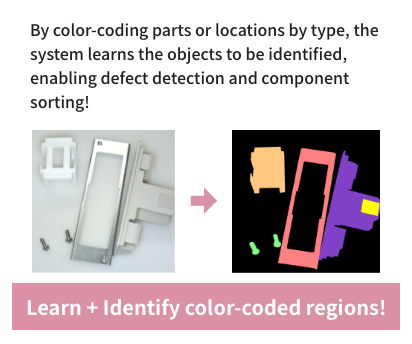
For objects contained within a single image, you can define regions and names on a pixel-by-pixel basis. Because names can be assigned at the pixel level, it can be used for applications such as "defect inspection" and "picking."
Easy Functions
Easily created training images
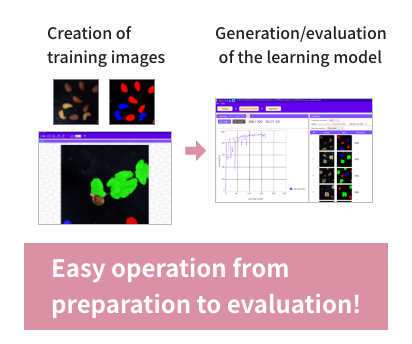
Creating labels for segmentation requires "coloring," but this can be done easily with mouse operations. The number of training images can also be increased, as it is equipped with an augmentation function. When evaluating after learning, the on-screen operations are intuitive, making evaluation simple.
Linkage with Various Applications
Linking with Facilea
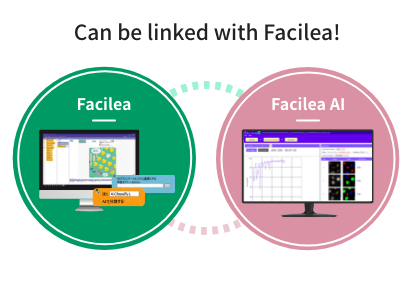
After learning with Facilea AI, linking the learning model file with Facilea is easy with just a single block. Additionally, the images used for learning can be edited and processed in Facilea.
Click here for Facilea
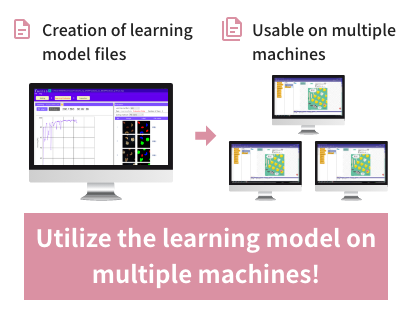
Utilize the model on multiple machines
Unlimited learning model files
The number of Facilea AI learning model files that can be output is unlimited, so you can use the learning model files on any number of Facilea installations. To use Facilea, please install the Facilea AI software; only the Facilea USB dongle is required.
Facilea AI Operating Environment
The following environment is required to use "Facilea AI."
(The information provided is current as of December 2023. All or part of the contents are subject to change without notice.)
OS (Operating System)
Windows 11/10 64bit
CPU
Intel Core i5 or higher
Required Memory
16GB or more
Graphics Board
NVIDIA GeForce RTX3060 or higher
Facilea AI "Price"
1 License (One-time purchase)
Please contact the sales office for pricing. We will send you the "license key" required to download the software and the "USB dongle" required to use Facilea AI.
Model No.: AES-FACILEA-AI
How to order
STEP 01
Place your order by phone
Please contact your nearest "Sales Office" or "Distributor" .
STEP 02
Shipment of the USB Dongle
After payment is received, CKD will send you the "license key" (a 20-digit alphanumeric code) and "USB dongle" required to download the software.
STEP 03
Download the Software
You can download the software by completing user registration from the "Initial Registration" section on this site. (A license key is required for registration.) If you are already registered as a user for Facilea or ExiaStudio, please "Login" and add the license from your user page.
STEP 04
Configure the Link between Facilea and Facilea AI
Configure the link between Facilea and Facilea AI. Please use the provided dongles to configure. When upgrading the version, please do so at your convenience from the login page. When upgrading the version, please "Login" and proceed at your convenience from your user page.
STEP 05
Start of Use
Please start "Facilea" on a PC with the USB dongle connected. To use Facilea, please install the Facilea AI software; only the Facilea USB dongle is required.
Usecase
Contact
Click here for Facilea
Image Processing AI Tool Facilea AI
Achieve AI (Image Learning) with No Code Easily link with rule-based Facilea using a single block.
Download Catalog
What is Facilea AI?
Achieve AI (learning functions) with no code, something that was not possible with the rule-based Facilea until now. Anyone can easily use AI (learning functions) while maintaining the core concept of Facilea. Facilea AI has two learning functions: "Classification" and "Segmentation." When learning is complete, a learning model file is output, which can be easily linked with the rule-based Facilea by using Facilea's AI block.
Facilea AI "Functions"
Labeling "per image"
Classification
Performs classification for each image. It supports everything from 2-class classification ("OK"/"NG") to multi-class classification with three or more categories.
Labeling "per region"
Segmentation
For objects contained within a single image, you can define regions and names on a pixel-by-pixel basis. Because names can be assigned at the pixel level, it can be used for applications such as "defect inspection" and "picking."
Easy Functions
Easily created training images
Creating labels for segmentation requires "coloring," but this can be done easily with mouse operations. The number of training images can also be increased, as it is equipped with an augmentation function. When evaluating after learning, the on-screen operations are intuitive, making evaluation simple.
Linkage with Various Applications
Linking with Facilea
After learning with Facilea AI, linking the learning model file with Facilea is easy with just a single block. Additionally, the images used for learning can be edited and processed in Facilea.
Click here for Facilea
Utilize the model on multiple machines
Unlimited learning model files
The number of Facilea AI learning model files that can be output is unlimited, so you can use the learning model files on any number of Facilea installations. To use Facilea, please install the Facilea AI software; only the Facilea USB dongle is required.
Facilea AI Operating Environment
The following environment is required to use "Facilea AI."
(The information provided is current as of December 2023. All or part of the contents are subject to change without notice.)
OS (Operating System)
Windows 11/10 64bit
CPU
Intel Core i5 or higher
Required Memory
16GB or more
Graphics Board
NVIDIA GeForce RTX3060 or higher
Facilea AI "Price"
1 License (One-time purchase)
Please contact the sales office for pricing. We will send you the "license key" required to download the software and the "USB dongle" required to use Facilea AI.
Model No.: AES-FACILEA-AI
How to order
STEP 01
Place your order by phone
Please contact your nearest "Sales Office" or "Distributor" .
STEP 02
Shipment of the USB Dongle
After payment is received, CKD will send you the "license key" (a 20-digit alphanumeric code) and "USB dongle" required to download the software.
STEP 03
Download the Software
You can download the software by completing user registration from the "Initial Registration" section on this site. (A license key is required for registration.) If you are already registered as a user for Facilea or ExiaStudio, please "Login" and add the license from your user page.
STEP 04
Configure the Link between Facilea and Facilea AI
Configure the link between Facilea and Facilea AI. Please use the provided dongles to configure. When upgrading the version, please do so at your convenience from the login page. When upgrading the version, please "Login" and proceed at your convenience from your user page.
STEP 05
Start of Use
Please start "Facilea" on a PC with the USB dongle connected. To use Facilea, please install the Facilea AI software; only the Facilea USB dongle is required.
Usecase
Contact
Click here for Facilea
Image Processing AI Tool Facilea AI
Achieve AI (Image Learning) with No Code Easily link with rule-based Facilea using a single block.
Download Catalog
What is Facilea AI?
Achieve AI (learning functions) with no code, something that was not possible with the rule-based Facilea until now. Anyone can easily use AI (learning functions) while maintaining the core concept of Facilea. Facilea AI has two learning functions: "Classification" and "Segmentation." When learning is complete, a learning model file is output, which can be easily linked with the rule-based Facilea by using Facilea's AI block.
Facilea AI "Functions"
Labeling "per image"
Classification
Performs classification for each image. It supports everything from 2-class classification ("OK"/"NG") to multi-class classification with three or more categories.
Labeling "per region"
Segmentation
For objects contained within a single image, you can define regions and names on a pixel-by-pixel basis. Because names can be assigned at the pixel level, it can be used for applications such as "defect inspection" and "picking."
Easy Functions
Easily created training images
Creating labels for segmentation requires "coloring," but this can be done easily with mouse operations. The number of training images can also be increased, as it is equipped with an augmentation function. When evaluating after learning, the on-screen operations are intuitive, making evaluation simple.
Linkage with Various Applications
Linking with Facilea
After learning with Facilea AI, linking the learning model file with Facilea is easy with just a single block. Additionally, the images used for learning can be edited and processed in Facilea.
Click here for Facilea
Utilize the model on multiple machines
Unlimited learning model files
The number of Facilea AI learning model files that can be output is unlimited, so you can use the learning model files on any number of Facilea installations. To use Facilea, please install the Facilea AI software; only the Facilea USB dongle is required.
Facilea AI Operating Environment
The following environment is required to use "Facilea AI."
(The information provided is current as of December 2023. All or part of the contents are subject to change without notice.)
OS (Operating System)
Windows 11/10 64bit
CPU
Intel Core i5 or higher
Required Memory
16GB or more
Graphics Board
NVIDIA GeForce RTX3060 or higher
Facilea AI "Price"
1 License (One-time purchase)
Please contact the sales office for pricing. We will send you the "license key" required to download the software and the "USB dongle" required to use Facilea AI.
Model No.: AES-FACILEA-AI
How to order
STEP 01
Place your order by phone
Please contact your nearest "Sales Office" or "Distributor" .
STEP 02
Shipment of the USB Dongle
After payment is received, CKD will send you the "license key" (a 20-digit alphanumeric code) and "USB dongle" required to download the software.
STEP 03
Download the Software
You can download the software by completing user registration from the "Initial Registration" section on this site. (A license key is required for registration.) If you are already registered as a user for Facilea or ExiaStudio, please "Login" and add the license from your user page.
STEP 04
Configure the Link between Facilea and Facilea AI
Configure the link between Facilea and Facilea AI. Please use the provided dongles to configure. When upgrading the version, please do so at your convenience from the login page. When upgrading the version, please "Login" and proceed at your convenience from your user page.
STEP 05
Start of Use
Please start "Facilea" on a PC with the USB dongle connected. To use Facilea, please install the Facilea AI software; only the Facilea USB dongle is required.
Usecase
Contact
Click here for Facilea
  • What is "Facilea AI"?
  • How to use
  • Contact
  • FAQ
  • Software
Terms of Service
Privacy Policy
  • What is "Facilea AI"?
  • How to use
  • Contact
  • FAQ
  • Software
Terms of Service
Privacy Policy
Terms of Service
Privacy Policy
Contact
Contact